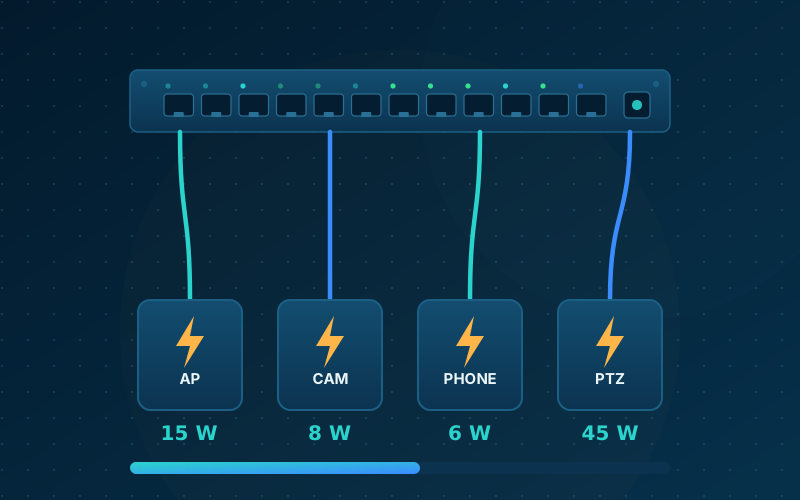
Power over Ethernet, or PoE, lets a switch send electrical power along the same cable that carries data. An access point or camera then needs only one cable and no power socket nearby.
The three standards
| Standard | Common name | Power at the switch port | Power available to the device |
|---|---|---|---|
| IEEE 802.3af | PoE | 15.4 W | 12.95 W |
| IEEE 802.3at | PoE+ | 30 W | 25.5 W |
| IEEE 802.3bt | PoE++ | 60 W or 90 W | 51 W or 71.3 W |
The device receives less than the port supplies because some power is lost as heat in the cable.
What typically uses what
- IP phones and simple fixed cameras: PoE
- Most Wi-Fi access points and cameras with heaters or infrared: PoE+
- High-performance access points and PTZ cameras: PoE++
The power budget
A switch has a total PoE budget as well as a limit for each port. A 24-port switch with a 370 W budget cannot supply 30 W on every port at once. Add up the maximum draw of every device and leave some headroom for growth.
Our PoE budget calculator does the arithmetic for you.
Practical tips
- Keep each cable run within 100 metres.
- Use good-quality solid copper cable. Copper-clad aluminium cable is not suitable for PoE.
- Put the PoE switch on a UPS, so that cameras and access points keep working during a power cut.
- Check the datasheet of each device for its real power draw.
References
- What is Power over Ethernet? (Cisco)
- IEEE 802.3bt-2018: Power over Ethernet over 4 pairs (ANSI Webstore listing)
General information, checked against the sources above (vendor documents, standards bodies and official guidance). Not professional advice. ARNSEC is independent; product names belong to their owners.
Last updated: . Articles are checked against trusted sources (vendor documentation, standards bodies and government guidance). General information only, not professional advice.